If you have only few contacts in
Lotus Notes mailbox, I’ll suggest you recreate them in Outlook because it will
easier to recreate them rather than exporting them into certain file formats
and import into Outlook profile. However, if you have the list of contacts,
there is another quicker way to move them into Outlook.
Monday, May 30, 2016
Sunday, September 27, 2015
Lotus Notes vs Outlook : Advantages and Limitations
Lotus Notes and
MS Outlook are the two most widely used email applications. However, there are
many users, who prefer using MS Outlook as compared to Lotus Notes. As a
result, you can find more Outlook users as compared to Lotus Notes. MS Outlook
is an email client from Microsoft, which aims at providing an effective and
secured mailing platform. In addition, there are several other benefits of
using MS Outlook as compared to Lotus Notes. Some of them are mentioned below.


Thursday, August 6, 2015
Top Reasons to Migrate From IBM Lotus Notes to Exchange Server
IBM
Lotus Notes/Domino and Microsoft Exchange Server are the two widely used email client-server
platforms in the world. But from last few years, Lotus Notes users are
migrating to Exchange Server very rapidly than ever. So, why is this happening and
what are the reasons which causing Lotus Notes being out of context?
Thursday, July 30, 2015
Lotus Notes 'file already Exists' Error? Repair Bookmark.nsf File
If you’re an admin/user of IBM Lotus
Notes, you had surely faced file already exists error when launching
Lotus Notes Client. But have you effectively encountered what is the root cause
of this error message and how you can resolve this issue?
Here in the post I am sharing the main
causes which prompts file already exists error in Lotus Notes and the solution
to fix the problem.
Root
causes of 'File Already Exists' Issue
The main cause is corrupt bookmark.nsf
file. It is the most significant configuration files in Lotus Notes which frequently
start working when you launch Lotus Notes application. But user cannot access
the file because it is already corrupt. So Lotus Notes try to create a new
bookmark.nsf file so that it can resolve the error itself. But again, the file
is previously created in Lotus Notes, that’s why you get file already exists
message on your screen.
Solution
Here I am taking one scenario where a
non-roaming user only uses the tiled workspace, and bookmark.nsf file has been
deleted on his Lotus Notes client. In this case, Lotus Notes can create itself
a new bookmark.nsf file with help of bookmark.ntf. But if the bookmark.nsf is
corrupted, the only way to resolve it by rebuilding the new bookmark.nsf file.
So, below are the steps which can be
followed to rebuild corrupt bookmark.nsf file-
·
Close Lotus Notes client and start Windows
Explorer.
·
Locate the bookmark.nsf file and rename it to
bookmark.oldk
Now just start Lotus Notes application
and you’re done! The new bookmark.nsf file has been recreated, and now you can
do the setting changes for 'homepage' to favorite values.
However, the above the solution
resolves the issue for mostly cases but if you couldn’t resolve it by simply
rebuilding the bookmark.nsf file, maybe the local perweb.nsf file is corrupt.
So, we’re the doing the same process (for
recreating perweb.nsf) as we did above to rebuilt bookmark.nsf file.
Steps
to repair Lotus Notes perweb.nsf by recreating it
·
Start Lotus Notes and set browser to Notes or
Open Notes. Once you’ve all done, exit Lotus Notes.
·
Open Lotus Notes Data Directory and look for
perweb.nsf file.
·
Once you find it, just rename the file and
restart the Lotus Notes application.
·
Now open the browser which you had set in
first step. By opening a web page, Lotus Notes will automatically recreate
perweb.nsf file.
That’s it. By following the above
solution you can fix Lotus Notes errors. But firstly, it is recommended to
check which root cause is responsible for this error, either bookmark.nsf
corruption or perweb.nsf corruption. Then only process the solution.
In the above scenario I’ve taken a
non-roaming user, but what to do if that is a roaming user? In this scenario
you will have to run few more steps to resolve this error.
Contact helpdesk or administrator and
ask them to temporary disable roaming for your Lotus Notes account and all PCs where
the application is installed. Once they’re done, you can follow the above
procedure to resolve file already exists error.
But don’t forget to enable the roaming
again, as it will be needed to recreated bookmark.nsf file.
Hope, the solution will resolve your
Lotus Notes error issue.
Monday, June 15, 2015
Out of Office Not Working in IBM Lotus Notes- Fixed
Like other email client platforms, IBM
Lotus Notes also brings OOO (Out of Office) features for Lotus Notes users. But
sometime, due to certain unspecified causes Lotus Notes Out of Office function
doesn’t work anymore. So today in this blog we’re going to outline this common
Lotus Notes issue, and try to figure out the root causes and solution to fix
Lotus Notes (8.5, 7x or later releases) Out of Office function not working issue.
When you encounter OOO feature is not
working as expected even after the feature enabling by the user, you can check
OOO information on Domino Server miscellaneous logs as below-
AMgr:
Agent 'OutOfOffice|OutOfOffice' in 'Mail\userdb.nsf' does not have proper
execution access, cannot be run b. Agent Manager: Error validating execution
rights for agent 'OutOfOffice|OutOfOffice' in database 'Mail\userdb.nsf'. Agent
signer 'User', effective user 'User2'. Users without rights to sign 'On Behalf'
agents can only run agents on their own behalf.
Solution-
To fix the issue, open Lotus Notes
Design Client and navigate through-
Lotus Notes Designer client: Look in
Code > Agents > OutOfOffice
Check OOO is enabled or disabled. If
it is disabled, enabled it and try again.
If it is already enabled, recreated
agents by deleting OutOfOffice agent and refresh design of the database.
Now again enable OOO function. This
fix works in mostly cases. However, if it doesn’t work for you; try the alternate
fix.
Alternate Solution-
IBM provides a diagnostic and
troubleshooting tool in case the Lotus Notes/Domino Out Of Office (OOO) does
not work properly.
You just need to Download
the OOO_Diagnostic_V2.1.zip troubleshooting tool and place it in local
Notes\Data directory. Before running the setup, read the ‘about the software’
and guide for how to use this software.
Now you can follow the steps to copy
Lotus Notes database to Data directory on Domino Server.
Now type the database name and path,
or select the database (relates with Domino) which you want to analyze. For
e.g. ‘mail\user.nsf’.
Now you will see the list of numerous tests,
select the last test from the list ‘comprehensive test’.
##
This tool support Notes/Domino 7x or later releases.
So, the issue also can be rectified by
using OOO diagnostic tool.
Thus, above are two best possible
methods to fix Lotus Notes automatic replay issue. Try manual troubleshooting as
well as diagnostic tool to resolve Lotus Notes/Domino OutOfOffice (OOO)
problem.
Thursday, February 26, 2015
How to recover-missing mailbox content while migrating from Lotus Notes to Office 365
There are
lots of circumstances where organizations need to migrate from IBM Lotus Notes
Server to Microsoft Office 365 dedicated. In doing so, a user may discover that
some of the email messages, contacts, calendar items, tasks, or folders are
found missing.
Monday, December 29, 2014
Migrating from Lotus Notes to Office 365
The number
of migrations from Lotus Notes to Microsoft Office 365 is increasing very
rapidly more than ever. The reason could be distinctive Lotus Domino
management, lesser preference, or the popularity of cloud based Office 365. Thus
that is why big to small organizations are shifting from Lotus Notes to cloud
based Office 365.
Monday, December 22, 2014
How to fix ‘File Does Not Exist’ error in Lotus Notes
IBM Lotus
Notes is among the most preferred email client in today’s business world, but
it doesn’t mean Lotus Notes is always error free and totally robust email
platform. Sometime, due to random causes an IBM Lotus Notes user may come
across a critical situation where he/she may get the following error code on their
Lotus Notes screen:
Thursday, November 20, 2014
Fix 'Maximum Request Length Exceeded' Error while Migrating Lotus Notes to Outlook
In today’s
corporate world, every organization requires an ideal email client as an
efficient communication medium. And Lotus Notes and MS Outlook are the two most
important email clients that have the maximum influence. So if an organization
is using Lotus Notes email client, and if they are required to migrate NSF
files into PST file format, then situation becomes more difficult in this case during
the migration of large sized NSF files to PST file format.
Wednesday, July 9, 2014
Fix IBM Notes Issues with Professional Recovery Tool
Lotus Notes one of the highly preferred email clients in business organizations; works in collaboration of IBM Domino. The reason why IBM Notes is this much popular is “It is not only an email client but it also acts as a personal manager for users and facilitates features like IM, Address book, To-dos, journals and many others. In most of the organizations this email client is preferred over Outlook because of data security concerns. Unlike Outlook and Exchange Server, Notes keeps all the data at one centralized location i.e on Domino Server in a single format file.
Notes uses NSF file format to keep user’s data; the word NSF stands for “Notes Storage Facility”. Lotus Notes NSF file is responsible for keeping user’s mail data like emails, calendar, address book, attachments etc. Notes keep all the address book data in a file named Names.nsf. One of the major advantages of Notes is, to access its database; one doesn’t need to be at his workplace computer. One can easily access the Domino server
data with the access of Internet from any location.
Wednesday, June 25, 2014
5 Common Lotus Notes Errors & Their Fixes
Lotus Notes is an email application that is intended to provide business network functionality and it includes features like instant messaging, contact management, receiving/sending emails, user directories, to-do lists, and calendars. Besides, this application also offers access and integration with IBM Domino application and database. Unfortunately, the database files of this application are likely to get corrupt, owing to several physical or logical errors. It is really very frustrating, especially when one receives the errors messages as it call to action to fix the error occurred with the application. Below is the list of top 5 common Lotus Notes errors and its solutions.
 |
| IMG SRC - nsftopstconverter.stellarservertools.com/ |
Tuesday, April 29, 2014
How to Solve Lotus Notes Error 0x1A5
Lotus Notes was actually developed by Lotus Development Corporation in 1989. But in 1995 it was acquired by highly famous IT organization known as IBM. Like Outlook an email client application works with Exchange Server a server application, Lotus Notes also collaborated with Lotus Domino to complete client-server architecture. Similar to other emailing applications, Lotus Notes also performs various tasks like managing emails, contacts, tasks, calendars, ToDo lists and many vital business oriented process. IBM keep on striving upon adding more user-friendly and advance features which can enhance the performance and work flow of the organization using Notes. It can be observed with the every launch of version, Notes has delivered some extra features which attracts the user towards the favour of the application.

Tuesday, March 25, 2014
Common Lotus Notes Errors and Recovery Solutions
Lotus
Notes is a well known emailing application, developed by IBM Corps. It is
considered amongst top three emailing platform with Microsoft Outlook and
Novell GroupWise. The first version of Notes application was launched in 1989 and the latest version launched is
Notes 9.0. Throughout the
development timeline of Lotus Notes, user experienced large number of
modifications that made the accessing much simpler and reliable. However there
are large numbers of error events available that bypass the technical efficiency
and make the situation troublesome for the user. In this article we will focus
upon few such events and their possible solutions.

Thursday, February 27, 2014
Domino Server 9.0 Social Edition – Features and Modifications Overview

In
the article we will read latest modifications and features included in the
latest version of Domino server. IBM’s Domino version 9.0 is the most trending
application of these days with the tag #socialedition. We will also learn about
new Domino Administrator functionalities that are compatible with IBM Notes
upgrade.
Wednesday, December 25, 2013
History Overview of IBM Lotus Notes Versions
When we talk about complex yet successful software then the only name we come across is Lotus Notes. The successful legacy of Notes involves a rich and interesting history. In this article we will come across various versions of Lotus Notes and understand about the technology up-gradation during these development phases. The early development of Lotus Notes even predates the development of personal computers. The first program was written in University of Illinois in Computer based Education Research Laboratory. The Lab released a product called PLATO Notes which has limited functionalities. The main purpose of PLATO Notes was to tag a bug report with the user’s ID and the date, also objective of Notes was to secure the file so that other user could not delete it. Later in 1976 Lab released PLATO Group Notes, which have almost the same concept of PLATO Notes.
However it allows user to create personal Notes files which are organized by the subject. It also allows user to create access lists, anonymous notes and director message flags. It also supports multiplayer games and can mark comments in a document. Because of the abovementioned features PLATO Notes became widely popular and sustained till 1980s. Soon after this, world acknowledged IBM PC and Microsoft MS-DOS, hence mainframe based PLATO became less in demand. In 1984, Ozzie under the contract which is also funded by Lotus developed the first release of Lotus Notes. The initial most versions of the Lotus Notes included emails, contact, database and online discussion. However there were two major issue available that inhibited user from enjoy the concept emailing technology to the fullest. The first issue was communication network, which was not uniform and fast, the second reason was the underdeveloped or less capable Operating System. Due to these reasons developers decided to use Lotus Notes as a PIM or personal information manager. In-order to cope up with those situations the developers had to write a lot of code at system level. The code was written to develop entities like Server and databases.
After sometime the Notes got a nick name groupware, which refers to an application that enhance communication process among groups of people. The group was capable enough to set up a dedicated Server device that can easily communicate with other group’s server machine. The Server machine transfer data through replicated data which has several other copies on different machines. The Notes just easily synchronizes them which facilitates the users or co workers working in different branches. Let us analyze the various versions of Lotus Notes:
Version 1.0

Version 1.1
The above stated version was not a feature release, in-fact it was first enhancement set made on Lotus Notes. The sole purpose of this release was to support more operating system and it indeed got successful in doing that. Also the application started supporting Windows 3.0 which was considered as a biggest achievement.
Version 2.0

Version 3.0

At the time when Lotus Note released version 3.0, almost 500,000 users were already engaged with it. The interface was modified and the application support Full text search feature. The sorting and filter mechanism was also included that eased the user up-to great extent. It also supports Apple Talk networks and Macintosh clients. Also the features like alternate email capability, selective replication, a server for Windows operating system enhanced the scalability of the application.
Version 4.0

Lotus Notes released version 4.0 in January 1996 and on the basis of feedback obtain from the user the developer made noticeable changes in the user interface. A programming language known as Lotus Notes was included in Lotus Notes. The new three paned interface categorized mail and other entities that reduced the confusion. The entire interface was launched for the server administrators. The in-built internet integration included Web browser which can be accessed with Notes database. With the introduction of IDE (Integrated development environment), Infoboxes and templates enhanced application development and programmability.
Version 4.5
With this version Lotus Notes 4.5 server’s name was changed to Domino 4.5. The server possesses open networking environment with capability of developing application for Lotus Notes. It also provided wide range of business solutions for Intra and Internet. The inclusion of new database management tools, cluster of Domino server, directory assistance and enhancement in administration process has made this new version much successful. The feature of security that includes control list and password expiration policy made the application much secure.
Version 5.0

Version 6.0

The version was launched with a wizard capable of customizing Welcome page. However the preview pane is similar to standard Notes databases. The version was launched in October 2002 and capable of doing more process in affordable price. The Lotus Domino designer was highly helpful in creating complex applications and in reusing the codes, which gradually saved time.
Version 6.5
IBM launched Lotus Notes and Domino 6.5 in September 2003, the version was strongly integrated with other IBM technologies. It was compatible with IBM Lotus Same time an instant messaging application and IBM Lotus Domino Web Access. The focus was depended upon the feedback provided by the end user in-order to make the application much acceptable.
Version7.0
The version 7 known as Lotus Notes/Domino 7 was released in August 2005. This version was compatible with lots of IBM developed technologies. The integrated technology included IBM WebSphere Portal and IBM DB2, due to this Lotus Domino 7 offered better collaboration with Web standards. The introduction of new Domino Domain Monitoring feature facilitates the administrator to look upon the status of multiple servers available across a domain or domains. Due these features the mechanism of client server architecture improved a lot providing much faster process of information sharing.
Version 8.0
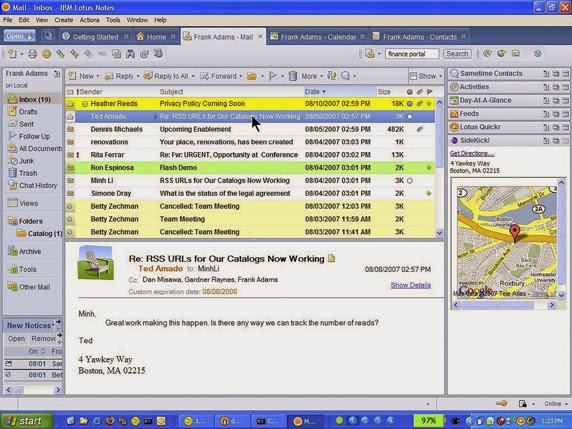 The aforementioned is an image of the interface of Lotus Notes 8, which was launched in August 2007. This email client application was based upon Eclipse framework. The eclipse application can be used in collaboration with Lotus Notes application. The Lotus Notes has become an open sourced Java based platform because of eclipse. The concept of button was introduced for the applications that are used most frequently. The activity centering computing is supported by the latest version IBM Lotus Notes. The collaboration history allows user to search and view information about the specific users.
The above discussed were some important features related to various versions of IBM Lotus Notes. But most of the user favors MS Outlook over Lotus Notes. Let us find out why despite of having a great legacy IBM Lotus Notes is not top priority of the users:
One such recommended tool is Stellar NSF to PST converter tool that can easily convert all the Notes data in Outlook supported format. The demo version of the tool is available at the respective website of the tool. Visit Website - http://nsftopstconverter.stellarservertools.com/
Version 8.0
The above discussed were some important features related to various versions of IBM Lotus Notes. But most of the user favors MS Outlook over Lotus Notes. Let us find out why despite of having a great legacy IBM Lotus Notes is not top priority of the users:
- The Notes is comparatively tough application than MS Outlook. User has to go through training program in-order to become fluent with the Notes technology.
- The installation and maintenance cost of Notes is much higher than MS Outlook.
- The IBM Lotus Notes is best suited for large organizations on the other hand MS Outlook is for all whether the user belongs to small firm or large.
- The IBM Lotus Notes is developed using highly complex technology that always troubles users for even minor processing.
One such recommended tool is Stellar NSF to PST converter tool that can easily convert all the Notes data in Outlook supported format. The demo version of the tool is available at the respective website of the tool. Visit Website - http://nsftopstconverter.stellarservertools.com/
Tuesday, December 24, 2013
Why To Priorities Outlook over Notes ?
Both, Microsoft Outlook and IBM Lotus Notes are professional email client applications. However Outlook has a bigger hand in terms of popularity. Let us find out with the help of "Outlook vs Lotus Notes Infographic" that what are the reasons behind the success of Outlook and the failure of Lotus Notes.
Tuesday, November 26, 2013
Remove Notes file truncation error using adroit recovery tool
Lotus Notes is an efficient email client application developed by widely popular organization known as IBM. The Lotus Notes client application is in collaboration with Domino Server. The interesting aspect of Lotus Notes and Domino Server is that they both share .nsf file formatting. This feature facilitates the user as the hectic and confusing task of file management is quite simple using the respective Client-Server application.
Thursday, November 14, 2013
Recover Lotus Notes NSF file Database after NSF file Corruption
Lotus Notes is one of the most trendy and
secure email clients used in big organizations. Lotus Notes keeps the entire
email database in NSF file. Lotus Notes is the creation of IBM; because of that
user can trust this application blindly.
This email application works in
correlation with Domino Server that guarantees the safety of Notes data. Lotus
Notes as an email client includes the following components:
Wednesday, October 30, 2013
Recovering corrupt NSF was not easy, until been through this
A Notes storage facility of Lotus Notes is commonly known as NSF files. The NSF files are used for storing emails and other vital data of Lotus Notes and Domino Server application. Lotus Notes is well known email client application which is used in collaboration with Domini Server. The application helps user to create address book, calendars, instant messaging, discussion groups and many more useful features. The NSF files are highly secure files as it is encrypted with latest algorithm that inhibits any unauthorized access. Nevertheless, the NSF files are not secure enough in terms of corruption related issues. Like any other data file, NSF formatted files are also prone to number of threats. Let us have a look over possible threats associated with NSF file corruption:-
“Reason and remedy for NSF error 0x1A5”
IBM developed Lotus Notes, an adroit email client application in year 1989. It acts as an integrated email client application that collaborates with IBM Domino Server. The staunch email application allows user to access business emails, applications, attachments, contacts, appointments, events, tasks, journals, and calendars. The Lotus Notes application is widely compatible and can work flawlessly on multiple operating systems like Windows, Linux, UNIX and Mac. Lotus Notes and Domino Server both store files in the form of NSF format. Lotus Notes consists of a distinguished feature of application development hence it is also compared to Microsoft SharePoint. The user friendly interface of Notes allows this application the functionality to access, store and present data in safe and secure environment. However there are multiple ways by which Notes NSF files get malfunctioned. In this article I would like to draw a light upon one of the common situations when Lotus Notes user finds difficulty while accessing NSF data.
Subscribe to:
Posts (Atom)