Showing posts with label convert nsf to pst. Show all posts

Wednesday, December 25, 2013

History Overview of IBM Lotus Notes Versions

When we talk about complex yet successful software then the only name we come across is Lotus Notes. The successful legacy of Notes involves a rich and interesting history. In this article we will come across various versions of Lotus Notes and understand about the technology up-gradation during these development phases. The early development of Lotus Notes even predates the development of personal computers. The first program was written in University of Illinois in Computer based Education Research Laboratory. The Lab released a product called PLATO Notes which has limited functionalities. The main purpose of PLATO Notes was to tag a bug report with the user’s ID and the date, also objective of Notes was to secure the file so that other user could not delete it. Later in 1976 Lab released PLATO Group Notes, which have almost the same concept of PLATO Notes.

However it allows user to create personal Notes files which are organized by the subject. It also allows user to create access lists, anonymous notes and director message flags. It also supports multiplayer games and can mark comments in a document. Because of the abovementioned features PLATO Notes became widely popular and sustained till 1980s. Soon after this, world acknowledged IBM PC and Microsoft MS-DOS, hence mainframe based PLATO became less in demand. In 1984, Ozzie under the contract which is also funded by Lotus developed the first release of Lotus Notes. The initial most versions of the Lotus Notes included emails, contact, database and online discussion.  However there were two major issue available that inhibited user from enjoy the concept emailing technology to the fullest. The first issue was communication network, which was not uniform and fast, the second reason was the underdeveloped or less capable Operating System. Due to these reasons developers decided to use Lotus Notes as a PIM or personal information manager. In-order to cope up with those situations the developers had to write a lot of code at system level. The code was written to develop entities like Server and databases.

After sometime the Notes got a nick name groupware, which refers to an application that enhance communication process among groups of people. The group was capable enough to set up a dedicated Server device that can easily communicate with other group’s server machine. The Server machine transfer data through replicated data which has several other copies on different machines. The Notes just easily synchronizes them which facilitates the users or co workers working in different branches. Let us analyze the various versions of Lotus Notes:

Version 1.0
The first version of Lotus Notes was shipped in 1989, the system requirement was DOS 3.1 or OS/2. The Server required DOS 3.1, 4.0 or OS/2. This version provided applications like Group Mail, Group Discussion and Group Phone Book.  Security and authenticity is the top priority of Notes, even in the first version they introduced RSA public key cryptography which satisfy the recipient that during transmission document was not altered or modified. It was the first commercial product to use any cryptographic technology for security purpose. The introduction of Dial up driver made the server access more interactive.

Version 1.1

The above stated version was not a feature release, in-fact it was first enhancement set made on Lotus Notes. The sole purpose of this release was to support more operating system and it indeed got successful in doing that. Also the application started supporting Windows 3.0 which was considered as a biggest achievement.

Version 2.0
The main objective of this version was to attain scalability, it was released in 1991. Initially Lotus Notes was preferred for small scale organizations, hence the developer focus to enhance it so that it can become feasible with large number of users. The rich text support was available with this version, also additional functions were included. User is allowed to have multiple names and address books, also one can forward documents from mail. The availability of larger database made the application look more promising. 

Version 3.0

At the time when Lotus Note released version 3.0, almost 500,000 users were already engaged with it. The interface was modified and the application support Full text search feature. The sorting and filter mechanism was also included that eased the user up-to great extent. It also supports Apple Talk networks and Macintosh clients. Also the features like alternate email capability, selective replication, a server for Windows operating system enhanced the scalability of the application.

Version 4.0  

Lotus Notes released version 4.0 in January 1996 and on the basis of feedback obtain from the user the developer made noticeable changes in the user interface.  A programming language known as Lotus Notes was included in Lotus Notes. The new three paned interface categorized mail and other entities that reduced the confusion. The entire interface was launched for the server administrators. The in-built internet integration included Web browser which can be accessed with Notes database. With the introduction of IDE (Integrated development environment), Infoboxes and templates enhanced application development and programmability.

Version 4.5

With this version Lotus Notes 4.5 server’s name was changed to Domino 4.5. The server possesses open networking environment with capability of developing application for Lotus Notes. It also provided wide range of business solutions for Intra and Internet. The inclusion of new database management tools, cluster of Domino server, directory assistance and enhancement in administration process has made this new version much successful. The feature of security that includes control list and password expiration policy made the application much secure.

Version 5.0

The version 5.0 was released in early 1999, it was known as descendent of version 1.0 as the architecture was backward compatible. The collaboration of Notes and Internet gave a new platform to the user so that they can enhance the business opportunity. The version supported fairly more Internet protocols and included an access to data stored in Notes database. The Domino administration became much easier because of enhanced registration, server monitoring and message management tools. The Internet messaging and directories included MIME and SMTP support. The accessibility of private and public data became much easier in time of urgency. The Internet messaging was involved with having support for all major Internet standards

Version 6.0

The version was launched with a wizard capable of customizing Welcome page. However the preview pane is similar to standard Notes databases. The version was launched in October 2002 and capable of doing more process in affordable price. The Lotus Domino designer was highly helpful in creating complex applications and in reusing the codes, which gradually saved time.

Version 6.5

IBM launched Lotus Notes and Domino 6.5 in September 2003, the version was strongly integrated with other IBM technologies. It was compatible with IBM Lotus Same time an instant messaging application and IBM Lotus Domino Web Access. The focus was depended upon the feedback provided by the end user in-order to make the application much acceptable.

Version7.0     
The version 7 known as Lotus Notes/Domino 7 was released in August 2005. This version was compatible with lots of IBM developed technologies. The integrated technology included IBM WebSphere Portal and IBM DB2, due to this Lotus Domino 7 offered better collaboration with Web standards. The introduction of new Domino Domain Monitoring feature facilitates the administrator to look upon the status of multiple servers available across a domain or domains. Due these features the mechanism of client server architecture improved a lot providing much faster process of information sharing.

Version 8.0
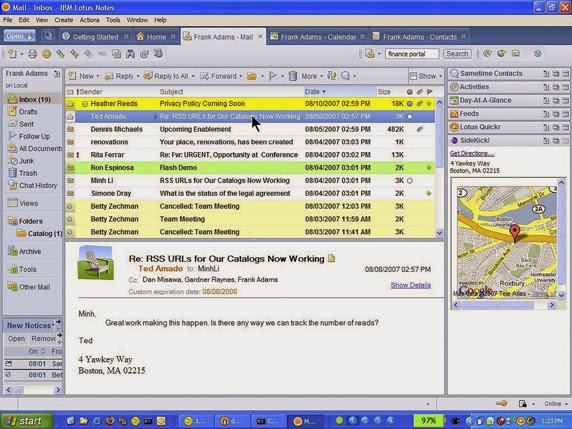
The aforementioned is an image of the interface of Lotus Notes 8, which was launched in August 2007. This email client application was based upon Eclipse framework. The eclipse application can be used in collaboration with Lotus Notes application. The Lotus Notes has become an open sourced Java based platform because of eclipse. The concept of button was introduced for the applications that are used most frequently. The activity centering computing is supported by the latest version IBM Lotus Notes. The collaboration history allows user to search and view information about the specific users.

The above discussed were some important features related to various versions of IBM Lotus Notes. But most of the user favors MS Outlook over Lotus Notes. Let us find out why despite of having a great legacy IBM Lotus Notes is not top priority of the users:
  • The Notes is comparatively tough application than MS Outlook. User has to go through training program in-order to become fluent with the Notes technology.
  •  The installation and maintenance cost of Notes is much higher than MS Outlook.
  •  The IBM Lotus Notes is best suited for large organizations on the other hand MS Outlook is for all whether the user belongs to small firm or large.
  •  The IBM Lotus Notes is developed using highly complex technology that always troubles users for even minor processing.
On considering aforementioned point user plans to switch from Lotus Notes to Outlook. But direct migration of files from Notes to Outlook is not possible because the former saves files in NSF format and the later one in PST or OST format. Therefore the only solution is to go for reliable and authentic third party NSF to PST converter tool.

One such recommended tool is Stellar NSF to PST converter tool that can easily convert all the Notes data in Outlook supported format. The demo version of the tool is available at the respective website of the tool. Visit Website - http://nsftopstconverter.stellarservertools.com/

Monday, June 4, 2012

Your guide to Convert NSF to PST

NSF to PST Converter is a must have for professional users who are looking to migrate from Lotus Notes to Microsoft Outlook. The need to convert from IBM Lotus Notes to MS Outlook might be switching from one organization to the other, migration of the organization itself from Lotus Notes to Outlook or for backup purposes.

Applications that can convert Lotus Notes to Outlook can help migrate from one email platform to the other with ease. If done erroneously, there is a strong possibility of data loss. In order to convert NSF to PST, both the applications must be installed either onto the source or destination computer system.

Thursday, January 19, 2012

Migration from NSF to PST is now a no sweat task

Lotus Notes is an expensive email client that not many organizations feel fits into their budget. A resonable solution that is the choice of major chunk of business organizations is MS Outlook. Outlook is a popular email client and personal information manager that that includes calendar, task manager, contact manager, notes, journals and attachments. Due to its ease of use and low maintenace cost, MS Outlook is preferred over IBM Lotus Notes.

Emails are the most important communication media used within organizations and migration from one email client to another is considered a tough gig. Microsoft has facilitated its users with a utility called 'Microsoft Transporter Suite' that exports user mailboxes from the Lotus Domino Server to Microsoft Exchange Server efficaciously. Though this tool is a matter of great relief for Lotus Notes users who want to migrate to MS Outlook, but there is a limitation of this utility. There is default maximum file size limit (4MB) of the NSF file that can be exported. A file size exceeding that limit will not be exported.

Organizations are on the look out for an effective, fast and reliable NSF to PST Converter that can migrate the entire Lotus Notes database to Outlook unfailingly. The best solution for successful NSF to PST Conversion in minimum time is through the aid of third party tools. Using NSF to PST Converter tools, emails, attachments, appointments, calendar entries, To-do lists, tasks, contacts etc. can be successfully converted to Outlook usable PST files.

Among the popular NSF to PST Converter tools available online, a reliable solution is “Stellar Phoenix NSF to PST Converter”. An adroit utility that performs selective conversion of Lotus Notes NSF file to MS Outlook PST file, this software allows the user to save mail items as EML/MSG/PST files. This software is designed on the grounds of simplicity and an interactive GUI keeping in mind both novice and professional users.

The demo version of the software offers a preview of the convertable Lotus Notes items to showcase its competency. Supporting Lotus Notes versions 8.5, 8.0.2, 7.0, 6.5 and 6.0 this powerful utility can create a new PST file or append the converted data into an exisiting one taking care of the entire conversion process, while you sit back and relax. The newly created PST file is easily imported into MS Outlook to access all the converted data. The demo version of the Lotus Notes Recovery tool facilitates the user to convert first 10 items of each mailbox folder as PST files, but in order to convert the entire folder or database the software has to be purchased.

Monday, December 26, 2011

Want to Convert NSF to PST Facilely? Efficacious NSF to PST Converter is here

Email messaging systems are the crux of communication in the corporate world. The leading email messaging systems that own the lion's share of the business cosmos are IBM Lotus Notes and Microsoft Outlook. Enterprises and individual users deploy these staunch email clients for effective communication via emails.

However, there is a sweeth tooth towards MS Outlook in view of multifarious reasons:

1.High cost of maintenance and deployment of Lotus Notes
2.Lotus Notes is not meant for novice users and requires expertise
3.Incurs lavish expenses as compared to Outlook


On the grounds of the aforementioned factors, a migration from IBM Lotus Notes to MS Outlook becomes imperative. Nonetheless, there are other reasons that devoir a NSF to PST Conversion. Many a times, Lotus Notes users operate from both office and home. Presence of Lotus Notes everywhere is out of the question. Many users have Outlook installed at home which makes it arduous to work on the Lotus Notes (NSF) file. Another reason is could be field job, where the user might need to operate from a different location that has Outlook configured instead of Lotus Notes. Moreover, when switching between organizations there are times when vital contacts and emails need to be carried to the new organization and that can only be done by converting Lotus Notes NSF file to MS Outlook PST file.

Such exigencies that devoir coexistence among the two email messaging platforms could be temporary or permanent. Migrating from Lotus Notes to Microsoft Outlook is a tedious task but with teeming NSF to PST Converter tools available in the market today, it has become a no sweat task.

Conversion from Lotus Notes to MS Outlook is a great relief at the times when a shuffling between these entirely incompatible clients is required. Lotus Notes have all the data stored in .nsf files while Outlook creates .pst files. Among the staunch NSF to PST Converter software available online, a dexterous solution is “Stellar Phoenix NSF to PST Converter”.

This efficacious tool converts the desired mail items as EML/MSG/PST files. All the precious emails, contacts, calender items, attachments, notes and journals are converted into PST files that can be imported into MS Outlook. Crafted for both novice and professional users, the software has an interactive GUI that is simple and easy to use. Exhibiting a high set of compatibility, the software supports Lotus Notes versions 8.5, 8.0.2, 7.0, 6.5 and 6.0. All major version of Outlook namely, 2010, 2007, 2003 and 2000 are compatible with this utility. Whatever be your call for NSF to PST Conversion, this powerful solution is the prudent choice to convert NSF to PST facilely.

Wednesday, December 14, 2011

Looking for a way to ingress Lotus Notes NSF files into Outlook? Convert NSF to PST

IBM Lotus Domino Servers and Microsoft Exchange Servers are the precursors of the global corporate world, administering business collaboration via emails. Email migration has been a commonplace activity owing to multifarious privy and professional requisites. A task that is considered a synonym for tough gig, email migration takes in a lot of time and effort. Many times minor user errors give rise to data loss, as not every IBM or Exchange user is a tech-geek.

Though Lotus Notes users and MS Outlook users are smug with the technology at hand, but certain events require a migration from the first to the second. Since the Lotus Notes files (NSF) and Microsoft Outlook files (PST) are not compatible with each other, a NSF to PST conversion becomes clamorous. A particular file format can not run everywhere. In order to access data, conversion into a compatible format is requisite.

IB Lotus Notes is a business software that is hosted by Lotus Domino Server and all the user data is stored in the .nsf (Notes Storage Facility) files. In the same manner, MS Outlook works in conjunction with Exchange Servers and the user data is stored in .pst (Personal Storage Table) files. To use NSF user data with MS Outlook, the users need to convert NSF to PST.

Conversion from NSF files to PST files should not be taken as a triffling affair, as data migration is a serious issue where one can not afford to loose even the slightest amount of vital data. The availability of NSF to PST converters in the market today is superfluous. However, before choosing any third party tool, go for a free trial to test the competency of the product, otherwise you could be in a position of serious data loss.

An accredited software to convert NSF to PST is “Stellar Phoenix NSF to PST Converter”. A cognant Notes to Outlook converter, this is an apt solution to convert Lotus Notes .nsf files to usable Outlook .pst files. The key features of this software is the ability to perform selective conversion. The free demo version of the software converts the first ten items of each milbox folder. Garnering a vast array of compatibility the NSF to PST Converter gives the option to save a mail item folder in PST/EML/MSG file format. The Lotus Notes Versions supported by this utility are 6.0, 6.5, 7.0, 8.0.2 and 8.5. The software is also compatible with the major versions of MS Outlook, namely, 2010, 2007, 2003, 2002 and 2000. If you are looking for a reliable tool to ingress NSF files into Outlook, Stellar Phoenix NSF to PST Converter is the perfect choice.

Wednesday, November 16, 2011

Stellar Launches Lotus Notes NSF Files to Microsoft Outlook PST Files Converter

NSF to PST Converter
Edison, N.J., 14th Nov 2011, Stellar Information Systems Limited is the leading data recovery company whose software and products are trusted and used world over. Adding another feather in its cap, Stellar has launched “Stellar Phoenix NSF to PST Converter”. This software converts Lotus Notes (.nsf) files to Microsoft Outlook (.pst) files. A Microsoft Gold certified partner, winner of many awards and accolades, Stellar has been offering excellent data recovery services garnering praise from its clients. Read more..