Lotus Notes is a collaborative
client-server application developed by IBM in 1989. It is an
integrated desktop client that connects and collaborates with IBM
Lotus Domino Server. Lotus Notes allows user to access business
e-mails, applications, contacts, attachments, appointments, events,
tasks, journals and calendars. Lotus Notes (LN) is one of the
earliest applications that is designed to work on Windows, Linux,
UNIX and Mac and can be accessed by LAN and WAN users. File that
Lotus Notes support for data storage is NSF that gets stored on the
system files on your Windows-based computer.
Showing posts with label Recover Lotus Notes. Show all posts
Showing posts with label Recover Lotus Notes. Show all posts
Wednesday, October 31, 2012
Thursday, May 3, 2012
Perform Lotus Notes Recovery by Compacting database when it exceeds its size limit
IBM Lotus Notes is a collaborative client application used for accessing business emails, calendars along with instant messaging, web browsing and many more features. The application works as a client for IBM Domino Servers. Lotus Notes stores all the data as a NSF (Notes Storage Facility) file.


Tuesday, October 18, 2011
Availability of third party Lotus Notes Recovery on Internet
Lotus Notes application is majorly used by the big organizations as they are able to afford its cost. The application is reliable and secure. NSF File is a file that is used by Lotus Notes application to store data of Lotus Notes objects, such as contacts, To-do, calendar-entries, journals, tasks, events, e-mails, etc. But, the file is prone to corruption. NSF file recovery is basically means to get back the lost or inaccessible data of Lotus Notes messaging application. Various factors directly result into corruption of Lotus Notes file. These factors include:
- Abnormal System Shutdown.
- Corruption of NSF file header.
- Checksum mismatch.
- Malicious Virus.
- Issues related to file system or operating system.
Normally, with the help of some inbuilt commands like fixup, updall, compact, etc issues related to NSF file corruption can be sort out easily. In many cases, such commands do not solve the issue. So, for similar kind of cases, it is good to opt for a third party tools. A lot of third party Lotus Notes recovery tools are available, it is important to be careful while doing selection of a third party tool. Many other unreliable companies also sold their products on the basis of fake commitments for the promotion of the product. This is the reason, it is advisable
to choose a product of a reliable company.
Stellar Phoenix Lotus Notes Recovery is a trustworthy solution provided by the Stellar Information Systems Ltd. The tool is one of the best tools for making NSF file free from corruption. This tool is developed under the experts that are quite technically sound. The tool has the potential to perform recovery of Lotus Notes file with much ease. In market several tools are available but to found software of same recovery results and effective recovery abilities is quite hard.
Tuesday, August 30, 2011
How to Resolve Lotus Notes Error “An Error Occurred While Opening a Window”
While working on Lotus Notes you may get different errors. These errors may halt your work and even results in some serious data loss situations. The main reasons behind these errors are database corruption, virus infection, or improper use or termination of the system or the Lotus Notes client. To recover from these errors you can use different tools like Fixup, Compact, Update and NT Check Disk utilities. These tools are provided by IBM but does not guarantee successful recovery in every case of Lotus Notes corruption.
Let's consider a practical scenario:
Suppose you are attempting to launch the Lotus Notes application but it fails with the error message.
“An Error Occurred While Opening a Window.”
This error will not allow you to open any window in Lotus notes application.
Reason: The reason behind this error is that Lotus Notes was not closed properly in last session and it have some processes running in background. Hence it can not be started again.
Resolution: To resolve this issue you just have to stop all the processes that are running in background. To do so either you have to restart the system or you can manually kill all Lotus Notes processes.
One other method to kill all the running Lotus Notes processes automatically is to run Killnotes.exe utility.
Follow below steps to run lotus notes utility:
1.From Start menu select Run.
2.Type the following command c:program fileslotusnotesnsd.exe –kill
3.Press Enter.
This utility will kill all the process used by Lotus Notes. After the process gets completed a result box pops-up that shows the count of killed processes.

Now you can open Lotus notes without any problem.
But if you you used KillNotes utility and still getting same error message and not able to open Lotus Notes you can use third party Lotus Notes recovery tool that will repair the database and make all your mailbox content accessible.
Let's consider a practical scenario:
Suppose you are attempting to launch the Lotus Notes application but it fails with the error message.
“An Error Occurred While Opening a Window.”
This error will not allow you to open any window in Lotus notes application.
Reason: The reason behind this error is that Lotus Notes was not closed properly in last session and it have some processes running in background. Hence it can not be started again.
Resolution: To resolve this issue you just have to stop all the processes that are running in background. To do so either you have to restart the system or you can manually kill all Lotus Notes processes.
One other method to kill all the running Lotus Notes processes automatically is to run Killnotes.exe utility.
Follow below steps to run lotus notes utility:
1.From Start menu select Run.
2.Type the following command c:program fileslotusnotesnsd.exe –kill
3.Press Enter.
This utility will kill all the process used by Lotus Notes. After the process gets completed a result box pops-up that shows the count of killed processes.
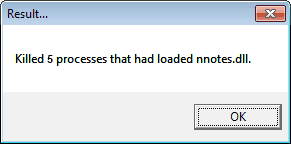
Now you can open Lotus notes without any problem.
But if you you used KillNotes utility and still getting same error message and not able to open Lotus Notes you can use third party Lotus Notes recovery tool that will repair the database and make all your mailbox content accessible.
Friday, July 29, 2011
How to Resolve “Database is corrupt -Can not allocate space” Error in Lotus Notes
Lotus Notes is an email client that is being widely used. Like any other application it is also pron to errors. The reasons behind the errors in Lotus Notes may be one or more of the following virus attacks, application problem, unexpected system shutdown, operating system issues, checksum mistakes, interaction of Lotus Notes with incompatible programs or NSF file header corruption. NSF file is the Notes Storage file that is used by Lotus Notes to save the data.
Let's discuss Lotus Notes Corruption with a practical Scenario.
Suppose you are working on Lotus Notes with Domino Server and you get halted with an error message that says
“Database is corrupt -- Can not allocate space”
It is one of the most common errors that has been noticed on various Domino server 5.0.5 or higher.
Reason: This error occurs when the 'Allow Soft Deletions' option in 'Advance Database Properties' is enabled. The database may gets corrupted when soft deletion is being enabled and non-summary data has been shifted to another location in the database.
Resolution: To fix up this issue follow below steps:
- Run Updall -R on all mail database
- Run Fixup -F -J
Both the utilities are provided and recommended by IBM with the note that these utilities can not recover in all cases.
Here the question arises how would recover your Lotus Notes data if it gets corrupted due to this issue. If you or the system administrator is performing regular backup and the same is available then you need not to worry, you can get all the data from the backup. But, in case there is no backup available, the only way to recover data is using third party NSF file recovery tool. Such tools are able to recover .nsf file in any case of corruption. Stellar Phoenix provides free version of the tool that previews all recoverable NSF file components and you need not be technically sound to use this tool.
Prevention for Future: To prevent the issue in future you should disable the Soft Deletion Feature of the database. Follow below steps to perform this:
- Go to File > Database > Properties
- Switch to Advance tab in the InfoBox
- Un-check the Allow Soft Deletion Check bob
Thursday, February 3, 2011
How to resolve error Generic LSE Failure (No More Information) in Lotus Notes 4.5.2?
IBM Lotus Notes is one of the most popular e-mail application programs used in modern era. It performs all the mail operations like e-mailing, calendaring, scheduling, programming etc which are performed by all common e-mail application programs like MS Outlook, Outlook Express etc. Lotus Notes database consists of NSF files as its data files. All the important data of Lotus Notes is stored in these NSF files. Thus NSF files can be considered as building blocks of IBM Lotus Notes database. Sometimes Lotus Notes database can get corrupt due to some error messages which will disable you to access the database, avoid sending/receiving e-mails etc. This scenario occurs because Lotus Notes NSF file has gone corrupt and needs to be repaired in order to access the damaged Notes document. Therefore to Repair NSF File, Lotus Notes users need to opt a third party Lotus Notes Recovery software which repair & recover corrupt Lotus Notes document.
To illustrate the above issue consider the following problem: Suppose you are using Lotus Notes 4.5.2 and when you try to open the Lotus Notes document, you encounter a following error message:
“Generic LSE Failure (No More Information)” Opening or Saving Document
The following error message can also be seen when you are saving a document which contains a component based on a user-defined template. As long as you receive the above error message, you will not be able to open or save the Lotus Notes document.
Cause:
This error message can occur when the document is created by a back-end Lotus Script process which creates a component based on a user-defined template.
Solution:
In order to resolve the above error message, you need to adopt following steps:
(1) First you open Lotus Notes 4.5.2.
(2) Now you add a new component object to the Lotus Notes document.
(3) After adding a new component, simply copy all the the information from the existing object.
(4) Now paste all the information to the new object.
(5) Delete the old existing object.
(6) Now close Lotus 4.5.2 & again open. Now you wont see error message depicting on the screen and you can easily open & save document
However even after performing above method doesn't solve the problem, then you must go for a third party Lotus Notes Repair tool. These tools Recover Lotus Notes database and allow the easy access to all e-mail items like messages, tasks, calendars, events, attachments, journals etc. Many softwares are available in the market that are specifically developed to Repair NSF File and recover damaged Lotus Notes database. Stellar Phoenix Lotus Notes Recovery v2.0 is one such software.
Stellar Phoenix Lotus Notes Recovery v2.0 is powerful Lotus Notes Recovery software that is used to repair and recover corrupted Lotus Notes e-mail items. The software supports IBM Lotus Notes 6.x and 7.x and is compatible with Windows 7, Vista, XP, 2003, 2000, NT4 (SP6). The software recovers NSF Files containing OLE objects, Java applets & style sheets. In addition to this it creates a log report of every recovery operation and saves it as a Text Editor (.txt) file. The software also comes with a “Live Update” feature which continuously installs recent software updates. Demo version of the software previews upto 5 items per folder & can be downloaded from the company's website: http://www.stellarservertools.com/lotus-notes-recovery.php
To illustrate the above issue consider the following problem: Suppose you are using Lotus Notes 4.5.2 and when you try to open the Lotus Notes document, you encounter a following error message:
“Generic LSE Failure (No More Information)” Opening or Saving Document
The following error message can also be seen when you are saving a document which contains a component based on a user-defined template. As long as you receive the above error message, you will not be able to open or save the Lotus Notes document.
Cause:
This error message can occur when the document is created by a back-end Lotus Script process which creates a component based on a user-defined template.
Solution:
In order to resolve the above error message, you need to adopt following steps:
(1) First you open Lotus Notes 4.5.2.
(2) Now you add a new component object to the Lotus Notes document.
(3) After adding a new component, simply copy all the the information from the existing object.
(4) Now paste all the information to the new object.
(5) Delete the old existing object.
(6) Now close Lotus 4.5.2 & again open. Now you wont see error message depicting on the screen and you can easily open & save document
However even after performing above method doesn't solve the problem, then you must go for a third party Lotus Notes Repair tool. These tools Recover Lotus Notes database and allow the easy access to all e-mail items like messages, tasks, calendars, events, attachments, journals etc. Many softwares are available in the market that are specifically developed to Repair NSF File and recover damaged Lotus Notes database. Stellar Phoenix Lotus Notes Recovery v2.0 is one such software.
Stellar Phoenix Lotus Notes Recovery v2.0 is powerful Lotus Notes Recovery software that is used to repair and recover corrupted Lotus Notes e-mail items. The software supports IBM Lotus Notes 6.x and 7.x and is compatible with Windows 7, Vista, XP, 2003, 2000, NT4 (SP6). The software recovers NSF Files containing OLE objects, Java applets & style sheets. In addition to this it creates a log report of every recovery operation and saves it as a Text Editor (.txt) file. The software also comes with a “Live Update” feature which continuously installs recent software updates. Demo version of the software previews upto 5 items per folder & can be downloaded from the company's website: http://www.stellarservertools.com/lotus-notes-recovery.php
Thursday, January 27, 2011
Lotus Notes ID file throws different error messages
Lotus notes ID file is the only file used to check the Notes user or Domino server. Without the Notes ID you fail to enter the Notes application. Domino administrator creates the Notes Ids. Notes ID is also important to install the full client. Without Lotus Notes ID file, you cannot access Notes servers with a full client. For security purpose, Notes ID is used. But at times, you stuck into various problems. Like, data of the Lotus Notes application becomes inaccessible for you. Number of technical reasons are responsible for these problems. Do not go with the reasons. Just try to focus to Recover Lotus Notes mailing application and for recovering it, no better option is available other than a Lotus Notes Recovery tool.
Let's consider a real example. When you try to connect to server with the help of a Lotus notes e-mail client, an error message is received:
“Error updating local ID file: The information in the supplied certificates from the Address Book entry is out of date.”
Data of the Lotus Notes mail database cannot be accessed.
Cause:
Above error is caused in Notes client every time a problem is faced in updating an ID file. Possible conditions are discussed below in which above error occurs:
(1) The public key stored in your Lotus Notes ID file is more updated than the Person document public key. In other words, your Person document public key does not match the Lotus Notes ID public key, which is more recent.
(2) ID information is not in sync with the Country Address Book and requires updation.
Resolution:
Solutions are discussed in an effective manner as per the cause:
(1) From Notes ID file, copy the public key and paste the public key into "Notes certified public key" field on Certificates >> Notes Certificates of Person document.
(2.1) Open Country Address Book on the server which contains the affected mail file, for e.g, (D12MLxxx) and open the affected ID entry.
(2.2) Exit Lotus Notes client and restart it.
If by doing above crucial steps the error gets resolved, then it is well and good. If not, the corruption might have crept-in, and you should opt for a third-party Lotus Notes Repair tool. Several tools are available that Repair Lotus Notes database quite easily. Data of the mail objects, such as To-do, calendar-entries, Inbox, and various others gets easily recovered with these specialised Lotus Notes applications.
Stellar Phoenix Lotus Notes Recovery v2.0 is a simple tool used to Recover Lotus Notes e-mail application from different corruption problems. This application gets easily installed on Windows 7, Vista, Server 2003, XP, 2000, and NT (SP6), and supports recovery of IBM Lotus Notes 6.x and 7.x.
Let's consider a real example. When you try to connect to server with the help of a Lotus notes e-mail client, an error message is received:
“Error updating local ID file: The information in the supplied certificates from the Address Book entry is out of date.”
Data of the Lotus Notes mail database cannot be accessed.
Cause:
Above error is caused in Notes client every time a problem is faced in updating an ID file. Possible conditions are discussed below in which above error occurs:
(1) The public key stored in your Lotus Notes ID file is more updated than the Person document public key. In other words, your Person document public key does not match the Lotus Notes ID public key, which is more recent.
(2) ID information is not in sync with the Country Address Book and requires updation.
Resolution:
Solutions are discussed in an effective manner as per the cause:
(1) From Notes ID file, copy the public key and paste the public key into "Notes certified public key" field on Certificates >> Notes Certificates of Person document.
(2.1) Open Country Address Book on the server which contains the affected mail file, for e.g, (D12MLxxx) and open the affected ID entry.
(2.2) Exit Lotus Notes client and restart it.
If by doing above crucial steps the error gets resolved, then it is well and good. If not, the corruption might have crept-in, and you should opt for a third-party Lotus Notes Repair tool. Several tools are available that Repair Lotus Notes database quite easily. Data of the mail objects, such as To-do, calendar-entries, Inbox, and various others gets easily recovered with these specialised Lotus Notes applications.
Stellar Phoenix Lotus Notes Recovery v2.0 is a simple tool used to Recover Lotus Notes e-mail application from different corruption problems. This application gets easily installed on Windows 7, Vista, Server 2003, XP, 2000, and NT (SP6), and supports recovery of IBM Lotus Notes 6.x and 7.x.
Tuesday, January 4, 2011
Use Lotus Notes Recovery Software when no other methods like compaction works for you
Compacting is needed when your database is exceeding its set size limitation. Basically, compacting means to remove the space that is allocated but unused. After compacting your database, you will find that your database is working more efficiently. Compacting a database, will make the unused space useful for you. When you perform deletion of the documents and attachments, the space that is left behind after compacting the database becomes useful. But many times, compacting the database does not help you sort out the issue. To overcome issues related to Lotus Notes application, you have to opt for a third party Lotus Notes Recovery tool to Recover Lotus Notes.
To illustrate the above issue, suppose you make an attempt to open a database locally with the help of a Lotus Notes application, the following error message appears on the screen that looks as given below:
"Database (.nsf) has grown too large; use File New Replica to recreate your file with larger capacity."
Above error message bothers you every time you try to open a database and make an attempt to make a new copy or a new replica of the database.
Cause:
The main cause for the occurrence of the above error message is that your Notes database has reached its size limit.
Resolution:
To resolve above error message, and to perform Lotus Notes Recovery, you need to compact the database. Compacting the database will help you to a great extent in solving the issue. For compacting the database, you have to right click on it, select a database, choose properties. In its second tab, select the option to compact.
If the above mentioned steps help you to sort out the issue, then it is fine. Otherwise, you will need to make use of a third party Lotus Notes Repair softwares. These tools Recover Lotus Notes database and all the data of the Lotus Notes mail components, such as contacts, attachments, appointments, To-do lists, calendar-entries, and more. There are many softwares available in the market which perform NSF File Recovery with great ease. Stellar Phoenix Lotus Notes Recovery v2.0 is one software.
Stellar Phoenix Lotus Notes Recovery v2.0 is a proficient tool that is used to repair & recover Lotus Notes database and other mail objects. The tool performs recovery of attachments, Java applets, OLE objects, and more. The repaired NSF file is stored in a location that can be easily detected by the host operating system. The tool is compatible with Windows 7, Vista, Server 2003, XP, 2000, and NT (SP6).
To illustrate the above issue, suppose you make an attempt to open a database locally with the help of a Lotus Notes application, the following error message appears on the screen that looks as given below:
"Database (.nsf) has grown too large; use File New Replica to recreate your file with larger capacity."
Above error message bothers you every time you try to open a database and make an attempt to make a new copy or a new replica of the database.
Cause:
The main cause for the occurrence of the above error message is that your Notes database has reached its size limit.
Resolution:
To resolve above error message, and to perform Lotus Notes Recovery, you need to compact the database. Compacting the database will help you to a great extent in solving the issue. For compacting the database, you have to right click on it, select a database, choose properties. In its second tab, select the option to compact.
If the above mentioned steps help you to sort out the issue, then it is fine. Otherwise, you will need to make use of a third party Lotus Notes Repair softwares. These tools Recover Lotus Notes database and all the data of the Lotus Notes mail components, such as contacts, attachments, appointments, To-do lists, calendar-entries, and more. There are many softwares available in the market which perform NSF File Recovery with great ease. Stellar Phoenix Lotus Notes Recovery v2.0 is one software.
Stellar Phoenix Lotus Notes Recovery v2.0 is a proficient tool that is used to repair & recover Lotus Notes database and other mail objects. The tool performs recovery of attachments, Java applets, OLE objects, and more. The repaired NSF file is stored in a location that can be easily detected by the host operating system. The tool is compatible with Windows 7, Vista, Server 2003, XP, 2000, and NT (SP6).
Thursday, December 30, 2010
Recovery of Lotus Notes database is not a tough task using a Lotus Notes Recovery Tool
A single file known as NSF file stores all your data of Lotus Notes application. Database of Lotus Notes application is saved with a .nsf file extension. This e-mail application offers wide range of mail-objects like To-dos, calendar-items, e-mails, contacts, tasks, events, and journals. But corruption of NSF file is one of the reason that makes all these mail-objects inaccessible. You can use replication and compression feature on NSF file to secure valuable data. But still, problem arises. At this stage, there is a need to Recover Lotus Notes database. Usually, number of solutions are available. But for better performance, opt for a third party Lotus Notes Recovery tool.
Let's elaborate above issue with an error message. Sometimes, you face data loss situation when you deal with Lotus Notes application. This is observed when NSF files of Lotus Notes become corrupt. Significant information cannot be approached. Additionally, different error messages prompt on the screen. One of the error message that is the result of NSF file corruption is given below:
“The Notes Database File Header is corrupt.”
Above error message does not allow you to access or manage mails that are received in Lotus Notes application.
Cause:
Above error message is caused because Lotus Notes NSF file gets corrupt. Corrupt Lotus Notes file makes all the data stored in it unapproachable.
Resolution:
It is necessary to solve above error message. Without solving the above error you cannot access important mails and the data of Lotus Notes application. So, it is necessary to solve above error message. Apply different methods to resolve problem that occurred because of NSF file corruption. After repairing Lotus Notes database, all the valuable e-mails can be easily retrieved. Use fixup, updall and compact commands. These commands help to repair Lotus Notes database. But it is not surety that after executing these commands, database gets repaired.
You have an option of a third party Lotus Notes Repair software. These tools can Recover Lotus Notes, and extract all the mail-objects, such as contacts, attachments, appointments, tasks, journals, and To-do items with much ease. No sound technical skills IS required to perform Lotus Notes Recovery using these specialized tools. Stellar Phoenix Lotus Notes Recovery v2.0 is one such software.
Stellar Phoenix Lotus Notes Recovery v2.0 is a comprehensive tool that is used to perform NSF File Recovery with great ease. It repairs NSF files of Lotus Notes 6.x and 7.x applications. All the mail-objects, such as contacts, attachments, appointments, messages, tasks, events, and various others can be easily recovered with this utility. It shows compatibility with Windows 7, Vista, XP, 2003, 2000, and NT4 (SP6).
Let's elaborate above issue with an error message. Sometimes, you face data loss situation when you deal with Lotus Notes application. This is observed when NSF files of Lotus Notes become corrupt. Significant information cannot be approached. Additionally, different error messages prompt on the screen. One of the error message that is the result of NSF file corruption is given below:
“The Notes Database File Header is corrupt.”
Above error message does not allow you to access or manage mails that are received in Lotus Notes application.
Cause:
Above error message is caused because Lotus Notes NSF file gets corrupt. Corrupt Lotus Notes file makes all the data stored in it unapproachable.
Resolution:
It is necessary to solve above error message. Without solving the above error you cannot access important mails and the data of Lotus Notes application. So, it is necessary to solve above error message. Apply different methods to resolve problem that occurred because of NSF file corruption. After repairing Lotus Notes database, all the valuable e-mails can be easily retrieved. Use fixup, updall and compact commands. These commands help to repair Lotus Notes database. But it is not surety that after executing these commands, database gets repaired.
You have an option of a third party Lotus Notes Repair software. These tools can Recover Lotus Notes, and extract all the mail-objects, such as contacts, attachments, appointments, tasks, journals, and To-do items with much ease. No sound technical skills IS required to perform Lotus Notes Recovery using these specialized tools. Stellar Phoenix Lotus Notes Recovery v2.0 is one such software.
Stellar Phoenix Lotus Notes Recovery v2.0 is a comprehensive tool that is used to perform NSF File Recovery with great ease. It repairs NSF files of Lotus Notes 6.x and 7.x applications. All the mail-objects, such as contacts, attachments, appointments, messages, tasks, events, and various others can be easily recovered with this utility. It shows compatibility with Windows 7, Vista, XP, 2003, 2000, and NT4 (SP6).
Logical corruption of NSF file can be easily recovered through Lotus Notes Recovery Tool
Lotus notes is a messaging application that employs database to store information like other applications. People can communicate easily and instantly by sending mails to other people. Most of the organizations only use Lotus Notes. All the professional communication, such as information related to projects is shared using this application. Many times, data of the Lotus Notes application becomes inaccessible. However, to overcome such a situation, users use different methods but the easiest and safest method is a Lotus Notes Recovery utility.
Text highlighted in Italics is an error message that appears on the screen when a user tries to open Lotus Notes e-mail application after a sudden shutdown of the system. He is unable to start the application when this error message appears:
“An Error Was Encountered While Opening A Window”
Above error bothers you whenever you try to access or open Lotus Notes messaging application.
Causes:
Any of the numerous mentioned reasons may be responsible for the above error. These are as follows:
(1) Failure of hardware components.
(2) Fatal Virus Infections
(3) Accidental or intentional deletion of NSF files
(4) Abrupt system shutdown
(5) Software bugs
(6) NSF file header corruption
(7) Checksum mismatch
Resolution:
To handle this issue follow the below steps:
(1) Go to Run and type taskmgr in the box.
(2) On opening the task manager, list of process will be shown. Select process as per your need whether you are desktop user or laptop user.
(3) Click on End button.
(4) Then, reopen lotus notes.
If performing the above simple steps does not solve the corruption problem, then you need to opt for a third party Lotus Notes Repair software. These third party Lotus Notes recovery tools are developed to Recover Lotus Notes and recoup all e-mail objects, such as messages, tasks, calendars, events, attachments containing images and videos with much ease. Search for a tool on the Internet and download its demo version, if available. Stellar Phoenix Lotus Notes Recovery v2.0 is one such software.
Stellar Phoenix Lotus Notes Recovery v2.0 is a result-oriented utility that is used to perform NSF File Recovery without changing the structure of the original file. It also recovers NSF files in case of logical corruption. The tool supports IBM Lotus Notes 6.x and 7.x. This software is compatible with Windows 7, Vista, XP, 2003, 2000, NT4 (SP6).
Text highlighted in Italics is an error message that appears on the screen when a user tries to open Lotus Notes e-mail application after a sudden shutdown of the system. He is unable to start the application when this error message appears:
“An Error Was Encountered While Opening A Window”
Above error bothers you whenever you try to access or open Lotus Notes messaging application.
Causes:
Any of the numerous mentioned reasons may be responsible for the above error. These are as follows:
(1) Failure of hardware components.
(2) Fatal Virus Infections
(3) Accidental or intentional deletion of NSF files
(4) Abrupt system shutdown
(5) Software bugs
(6) NSF file header corruption
(7) Checksum mismatch
Resolution:
To handle this issue follow the below steps:
(1) Go to Run and type taskmgr in the box.
(2) On opening the task manager, list of process will be shown. Select process as per your need whether you are desktop user or laptop user.
(3) Click on End button.
(4) Then, reopen lotus notes.
If performing the above simple steps does not solve the corruption problem, then you need to opt for a third party Lotus Notes Repair software. These third party Lotus Notes recovery tools are developed to Recover Lotus Notes and recoup all e-mail objects, such as messages, tasks, calendars, events, attachments containing images and videos with much ease. Search for a tool on the Internet and download its demo version, if available. Stellar Phoenix Lotus Notes Recovery v2.0 is one such software.
Stellar Phoenix Lotus Notes Recovery v2.0 is a result-oriented utility that is used to perform NSF File Recovery without changing the structure of the original file. It also recovers NSF files in case of logical corruption. The tool supports IBM Lotus Notes 6.x and 7.x. This software is compatible with Windows 7, Vista, XP, 2003, 2000, NT4 (SP6).
Tuesday, December 7, 2010
Resolving Lotus Notes error message "An Error Occurred While Opening a Window."
When you are working with IBM Lotus Notes application, you may experience different kinds of error messages hindering your work. Database Corruption and internal settings are the main reasons which result in the origination of various kinds of error messages in Lotus Notes application. To cope up with such errors Lotus Notes users can use different tools like Fixup, Compact, update and NT Check Disk utilities for their removal. But sometimes even after using these tools, some exceptions may occur which can result in obtaining poor results. Therefore in order to get proper results, a suitable Lotus Notes Recovery software is required which can Recover Lotus Notes database with great efficiency.
To illustrate above problem consider the following example. When you try to open a window in Lotus Notes application an error message appears on the screen. On every attempt while opening a window in Lotus Notes database, you will receive same error message:
"An Error Occurred While Opening a Window."
Thursday, November 11, 2010
Resolving error message “This database cannot be read due to an invalid on disk structure.”
While working with the Lotus Notes application, you may receive error messages. Usually, the reason for the occurrence of different errors is the corruption of database. Along with, database corruption the internal settings are also one of the main reasons that results in different errors. In such situation, you need to apply different utilities, such as Fixup, Compact, update and NT Check Disk utilities. But after using these utilities, some another exceptions may also appear and it's not sure that you will get proper results. However, for better results a Lotus Notes Recovery software is also one of the most prominent options that Recovers Lotus Notes database.
To illustrate above problem consider the following example. When you try to send mail from the Lotus Notes application an error message appears on the screen. On every attempt to send mail from Lotus Notes mail application you will receive below error:
“Server Error: This database cannot be read due to an invalid on disk structure”.
Mail that you try to send is shown to be successfully sent by your mail account, but still an error message will be prompt.
Cause:
When Sent folder is corrupt, and bad spot on drives results in the error: “This database cannot be read due to an invalid on disk structure.”
Solution:
This sometimes happens if you are using Notes with a database that has an R5 on disk structure. Right click on the background of the workspace, and choose “Workspace Properties”. Following steps will describe how you can resolve this error message:
(1) Click on the white i on the blue background.
(2) Increase the value in the box by 5.
(3) Click on “Compact”.
(4) Try opening the database, if it still gives an error then do the following:
(4.1) Make a doclink of the problem database, by selecting it then “Edit->Copy as link->Database Link” and paste it into a new Outlook/Notes memo.
(4.2) Remove the problem database from the workspace, by right clicking on the icon and selecting “Remove from workspace”.
(4.3) Re-add the database by clicking on the doclink.
(4.4) Delete the Outlook/Notes memo.
However if you dont want to create a new database, you have an another option of using a suitable Lotus Notes Recovery Tool.
Number of tools are available in the market that are specially meant to Repair Lotus Notes database. After performing Lotus Notes Recovery with a suitable software you can access mail-objects, such as messages, contacts, appointments, attachments, tasks, and journals etc.
Stellar Phoenix Lotus Notes Recovery v2.0 tool is a powerful tool that repairs & Recovers Lotus Notes NSF file & restores them in original format to any user-intended location. The software recovers journals, tasks, To-do, calendar-entries, contacts, attachments, and appointments etc. It supports IBM Lotus Notes 6.x and 7.x and is compatibile with Windows 7, Vista, XP, 2000, 2003, NT4(SP6). Additionally, a live update feature is also present to install recent software updates.Visit software - http://www.stellarservertools.com/lotus-notes-recovery.php
To illustrate above problem consider the following example. When you try to send mail from the Lotus Notes application an error message appears on the screen. On every attempt to send mail from Lotus Notes mail application you will receive below error:
“Server Error: This database cannot be read due to an invalid on disk structure”.
Mail that you try to send is shown to be successfully sent by your mail account, but still an error message will be prompt.
Cause:
When Sent folder is corrupt, and bad spot on drives results in the error: “This database cannot be read due to an invalid on disk structure.”
Solution:
This sometimes happens if you are using Notes with a database that has an R5 on disk structure. Right click on the background of the workspace, and choose “Workspace Properties”. Following steps will describe how you can resolve this error message:
(1) Click on the white i on the blue background.
(2) Increase the value in the box by 5.
(3) Click on “Compact”.
(4) Try opening the database, if it still gives an error then do the following:
(4.1) Make a doclink of the problem database, by selecting it then “Edit->Copy as link->Database Link” and paste it into a new Outlook/Notes memo.
(4.2) Remove the problem database from the workspace, by right clicking on the icon and selecting “Remove from workspace”.
(4.3) Re-add the database by clicking on the doclink.
(4.4) Delete the Outlook/Notes memo.
However if you dont want to create a new database, you have an another option of using a suitable Lotus Notes Recovery Tool.
Number of tools are available in the market that are specially meant to Repair Lotus Notes database. After performing Lotus Notes Recovery with a suitable software you can access mail-objects, such as messages, contacts, appointments, attachments, tasks, and journals etc.
Stellar Phoenix Lotus Notes Recovery v2.0 tool is a powerful tool that repairs & Recovers Lotus Notes NSF file & restores them in original format to any user-intended location. The software recovers journals, tasks, To-do, calendar-entries, contacts, attachments, and appointments etc. It supports IBM Lotus Notes 6.x and 7.x and is compatibile with Windows 7, Vista, XP, 2000, 2003, NT4(SP6). Additionally, a live update feature is also present to install recent software updates.Visit software - http://www.stellarservertools.com/lotus-notes-recovery.php
Resolve Errors related to Lotus Notes Application with Lotus Notes Recovery Tool
Lotus Notes NSF file is a repository that stores data. Whole data of the application resides in NSF file. When situation of data loss occurs, data related to NSF file becomes totally inaccessible. Behind inaccessibility of data, corruption is one of the reasons. When NSF file gets corrupt because of any reason, you cannot work with the Lotus Notes application. To access the important data of the file use an updated backup. If there is non-availability of backup, then another option with you is to go for a third party Lotus Notes Recovery tool. To Recover Lotus Notes file from this tool is quite easy approach.
Here is an error that appears on the system screen, when your attempt to open the Lotus Notes file after moving the file out of directory and back again remains unsuccessful. An error message that flashes on the screen is too big in length:
“Database Fixup: Started
**** DbMarkCorruptAgain(Both SB copies are corrupt), DB=f:\pmktfiling2004.nsf T
ID=[0DA4:0002-0D14] File=dbsuper.c Line=398 ***
18/02/2006 12:32:32 PM Unable to fixup database f:\pmktfiling2004.nsf: Database
is corrupt -- Cannot allocate space
18/02/2006 12:32:32 PM Database Fixup: Shutdown
C:\Program Files\lotus\notes>ncompact f:\pmktfiling2004.nsf
The ID file being used is: C:\Program Files\lotus\notes\data\Ap050214.id
Enter password (press the Esc key to abort):
**** DbMarkCorruptAgain(Both SB copies are corrupt), DB=f:\pmktfiling2004.nsf T
ID=[0D90:0002-0D40] File=dbsuper.c Line=398 ***
18/02/2006 12:33:14 PM Database compactor error: Database is corrupt -- Cannot allocate space
Database is corrupt -- Cannot allocate space.”
After getting the message, mails that contains important data are of no use. Because data becomes totally inaccessible.
Cause:
The root cause for the occurrence of the above error message is corruption. Corruption in the Lotus Notes file occurs because of several reasons, such as fatal virus attack, issues related to application, header of the NSF file is corrupt, power outage, checksum mismatch, incompatibility issue, and problem related to operating system.
Solution:
To resolve above error message and to access the data of the Lotus Notes application. Availability of backup helps to recover data that is unapproachable. This tip is helpful if you have an updated backup in your system.
However, if you do not have an updated backup in your system, then go for a third party Lotus Notes Recovery software. The tool Repair Lotus Notes NSF file in all sorts of corruption. A lot of software are available in the market. It is not necessary to have a sound technical skills to deal with the software. Stellar Phoenix Lotus Notes Recovery v2.0 is one such software which repairs NSF file with great ease.
Here is an error that appears on the system screen, when your attempt to open the Lotus Notes file after moving the file out of directory and back again remains unsuccessful. An error message that flashes on the screen is too big in length:
“Database Fixup: Started
**** DbMarkCorruptAgain(Both SB copies are corrupt), DB=f:\pmktfiling2004.nsf T
ID=[0DA4:0002-0D14] File=dbsuper.c Line=398 ***
18/02/2006 12:32:32 PM Unable to fixup database f:\pmktfiling2004.nsf: Database
is corrupt -- Cannot allocate space
18/02/2006 12:32:32 PM Database Fixup: Shutdown
C:\Program Files\lotus\notes>ncompact f:\pmktfiling2004.nsf
The ID file being used is: C:\Program Files\lotus\notes\data\Ap050214.id
Enter password (press the Esc key to abort):
**** DbMarkCorruptAgain(Both SB copies are corrupt), DB=f:\pmktfiling2004.nsf T
ID=[0D90:0002-0D40] File=dbsuper.c Line=398 ***
18/02/2006 12:33:14 PM Database compactor error: Database is corrupt -- Cannot allocate space
Database is corrupt -- Cannot allocate space.”
After getting the message, mails that contains important data are of no use. Because data becomes totally inaccessible.
Cause:
The root cause for the occurrence of the above error message is corruption. Corruption in the Lotus Notes file occurs because of several reasons, such as fatal virus attack, issues related to application, header of the NSF file is corrupt, power outage, checksum mismatch, incompatibility issue, and problem related to operating system.
Solution:
To resolve above error message and to access the data of the Lotus Notes application. Availability of backup helps to recover data that is unapproachable. This tip is helpful if you have an updated backup in your system.
However, if you do not have an updated backup in your system, then go for a third party Lotus Notes Recovery software. The tool Repair Lotus Notes NSF file in all sorts of corruption. A lot of software are available in the market. It is not necessary to have a sound technical skills to deal with the software. Stellar Phoenix Lotus Notes Recovery v2.0 is one such software which repairs NSF file with great ease.
Subscribe to:
Posts (Atom)